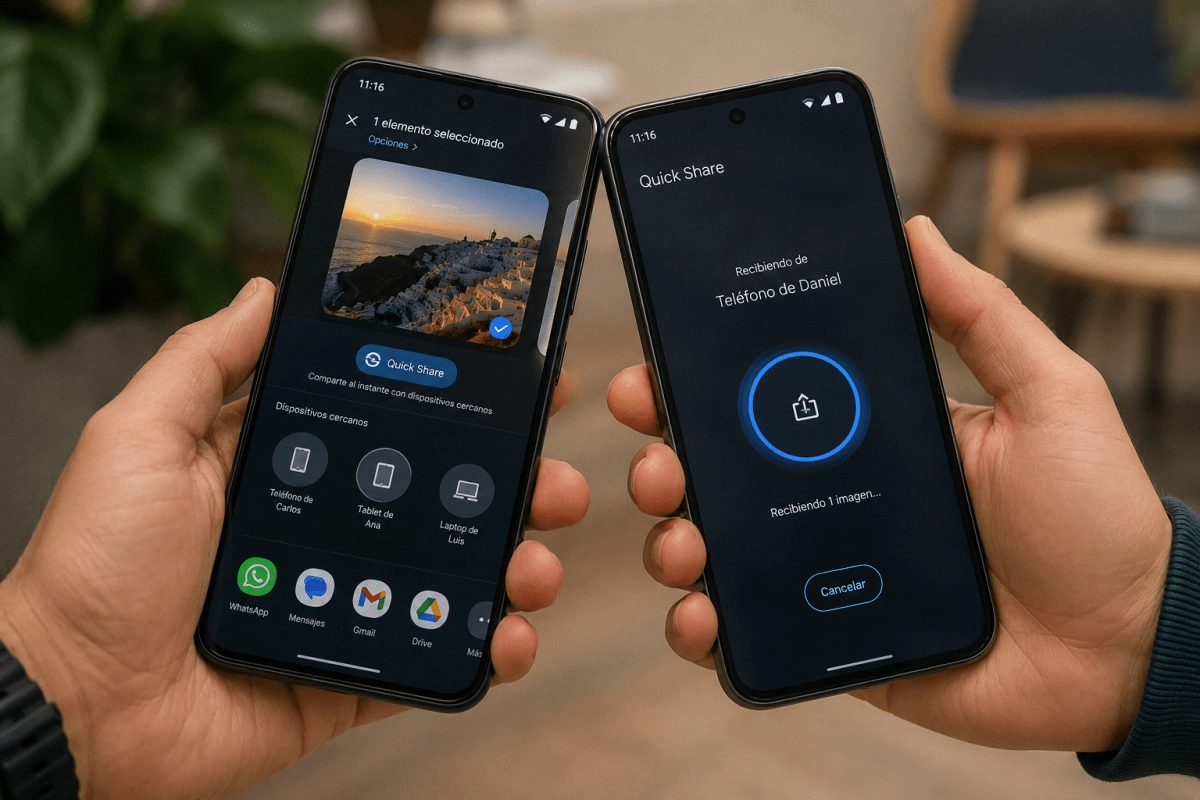

Google has presented Android tap to share, a new function that seeks to simplify one of the most frequent mobile gestures, sharing content with another person. The novelty was announced during Made by Google and introduces a much more direct way to use Quick Share on compatible Android devices.
The idea is easy to understand. Two mobile phones approach each other, touch each other and that gesture activates the exchange. Google wants to make sharing a photo, video or contact information stop feeling like a task with several menus involved. The phone detects that there is another device nearby and prepares the transfer from a physical, fast and quite intuitive interaction.
Until now, sending a file between Android phones involved opening the content, tapping the share button, locating Quick Share, selecting the receiving device and waiting for confirmation. Nothing particularly complicated, although there are enough steps for many users to end up resorting to a messaging app.
With Android tap to share, the experience gains immediacy. The user chooses what they want to send and brings their mobile phone closer to the other person. The touch between devices becomes the trigger for the exchange, avoiding the need to manually search for a nearby phone within a list.
This proposal has potential in very everyday moments.
Google is betting on an experience that feels more physical and less loaded with intermediate screens. The action of bringing two phones together already communicates a clear intention. Now Android interprets that gesture to start a content transfer.
How Android tap to share works on Pixel phones
Android tap to share is based on Quick Share, Android's nearby sharing tool. Its operation is based on a very simple requirement. The two devices must support the feature and be close enough to recognize the touch between them.
For photos and videos, the process starts from the phone's share sheet. The user opens the image, clip, or file selection, taps share, and chooses Quick Share. Then, you just have to bring your phone closer to the receiving device to complete the gesture.
The feature is intended to eliminate some of the usual friction. Instead of asking the user to browse a list of available devices, Google proposes a system that links physical proximity with the intention to send content. It's a simple interaction, although behind it is a deeper integration of Quick Share into the Android software.
One of the most striking details is in the contacts. When two users have the home screen open on their compatible mobile phones, they can bring the devices together to exchange their contact information bidirectionally. In other words, both can receive each other's information using the same gesture.
This can be useful in professional contexts, in meetings with new contacts and in much more informal situations. There is no need to dictate a number, search for a social profile or send a test message to save someone in your calendar. The mobile phone simplifies that small moment of connection.
Google has confirmed that tap to share allows you to share mainly these elements.
The proposal prevents the user from having to choose an external platform for each type of file. Sharing a photo no longer depends on generating a link in the cloud or sending it through a specific conversation. Quick Share becomes the direct channel between the two phones, with a gesture that is easy to remember even for those who do not know the functions of Android in depth.
Google prepares the expansion of tap to share on Android
The new function begins its journey in the Pixel 6 and later models. Google has also announced that it will soon arrive on the Samsung Galaxy Z Fold8 Ultra, Galaxy Z Fold8 and Galaxy Z Flip8. The company hopes to expand availability to more Android devices before the end of the year.
Launching on Pixel makes sense. Google uses its own phones to debut new Android experiences and demonstrate how they should feel within the ecosystem. However, the real value of tap to share will depend on whether it reaches a wide number of phones from different brands.
If adoption progresses, this feature may become one of those tools that seem small until used several times. Convenience doesn't come from adding a completely new capability to the phone. It comes from doing something that millions of people do every day faster.
Google wants sharing to stop being a series of decisions and become an almost automatic gesture. Android tap to share aims for a more fluid, social and close experience, especially for those who use their mobile as a camera, work tool and daily communication center.