
If your router at home transmits in 2.4 GHz and 5 GHz at the same time, you are probably not getting the most out of it. Most people connect all their devices to the same network without thinking twice, and that little oversight could be slowing down your Netflix, your online gaming, or even your work video call. The good news is that understanding the difference between the two frequencies doesn't require being an engineer, just a little technological common sense.
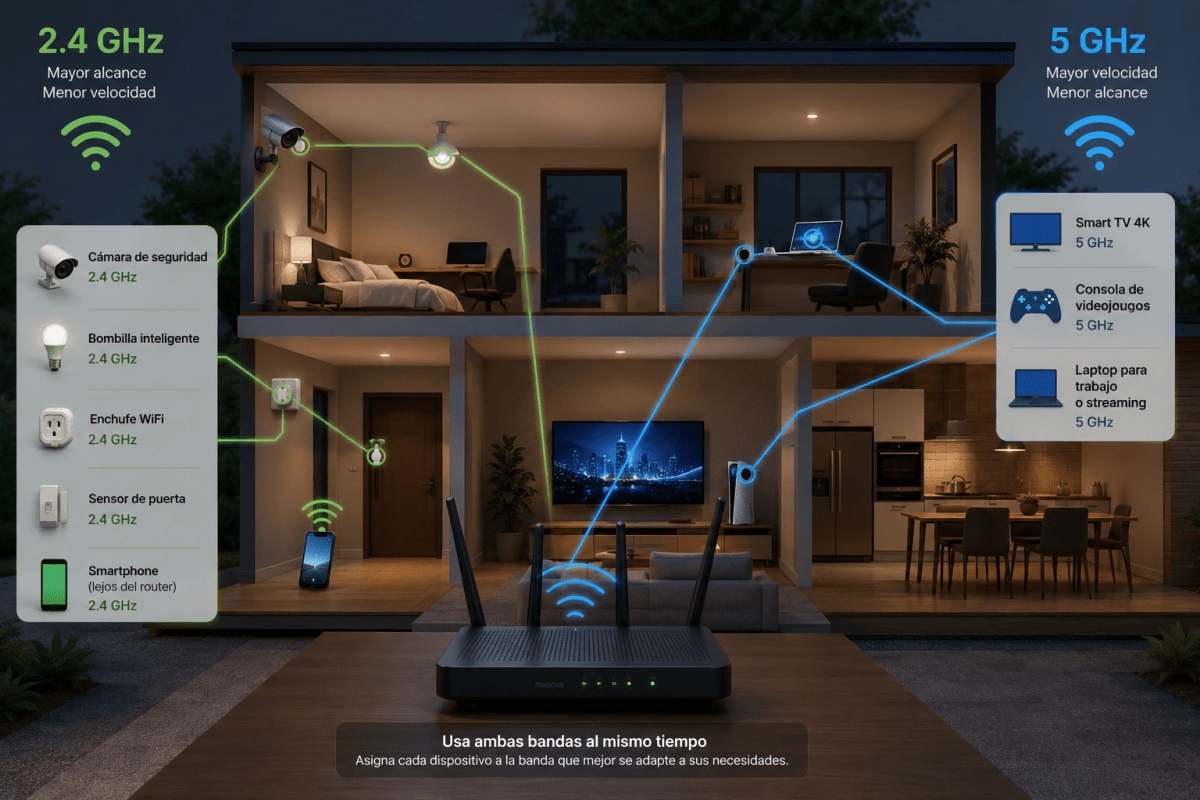
The 2.4 GHz band has a much longer range because its signal passes through walls and obstacles more easily, but you pay for that privilege with lower speeds. The 5 GHz does just the opposite, offering brutal speeds but losing power as soon as it hits a thick wall or several floors away. None is “the best”, each one shines in its own field and the key is to distribute your devices according to what they really need.
What to connect to each band so that everything works better?
This is where most people go wrong, because it is not about choosing a side but about assigning tasks according to the work each device does.
For the 5 GHz band it is advisable to reserve everything that requires speed and stability in real time. This frequency is also ideal for transferring large files between devices within the home, which is common if you work with images or video as part of your content production.
The 2.4 GHz band, on the other hand, is the perfect home for devices that don't need speed but do need constant coverage. It's also the logical choice for older devices that don't even support 5GHz, because trying to force them would only unnecessarily saturate the fast band.
Extra tricks to get the most out of your router
Separating devices by band is just the first step, but there are additional settings that make a real difference on a day-to-day basis.
Applying these changes takes no more than fifteen minutes, but can completely transform the streaming, gaming, and remote work experience in your home. The next time your WiFi feels slow, before blaming your provider, check to see if you're using the correct band for each device.